Challenges of a digital menu in a traditional Portuguese restaurant
A menu is not a static document
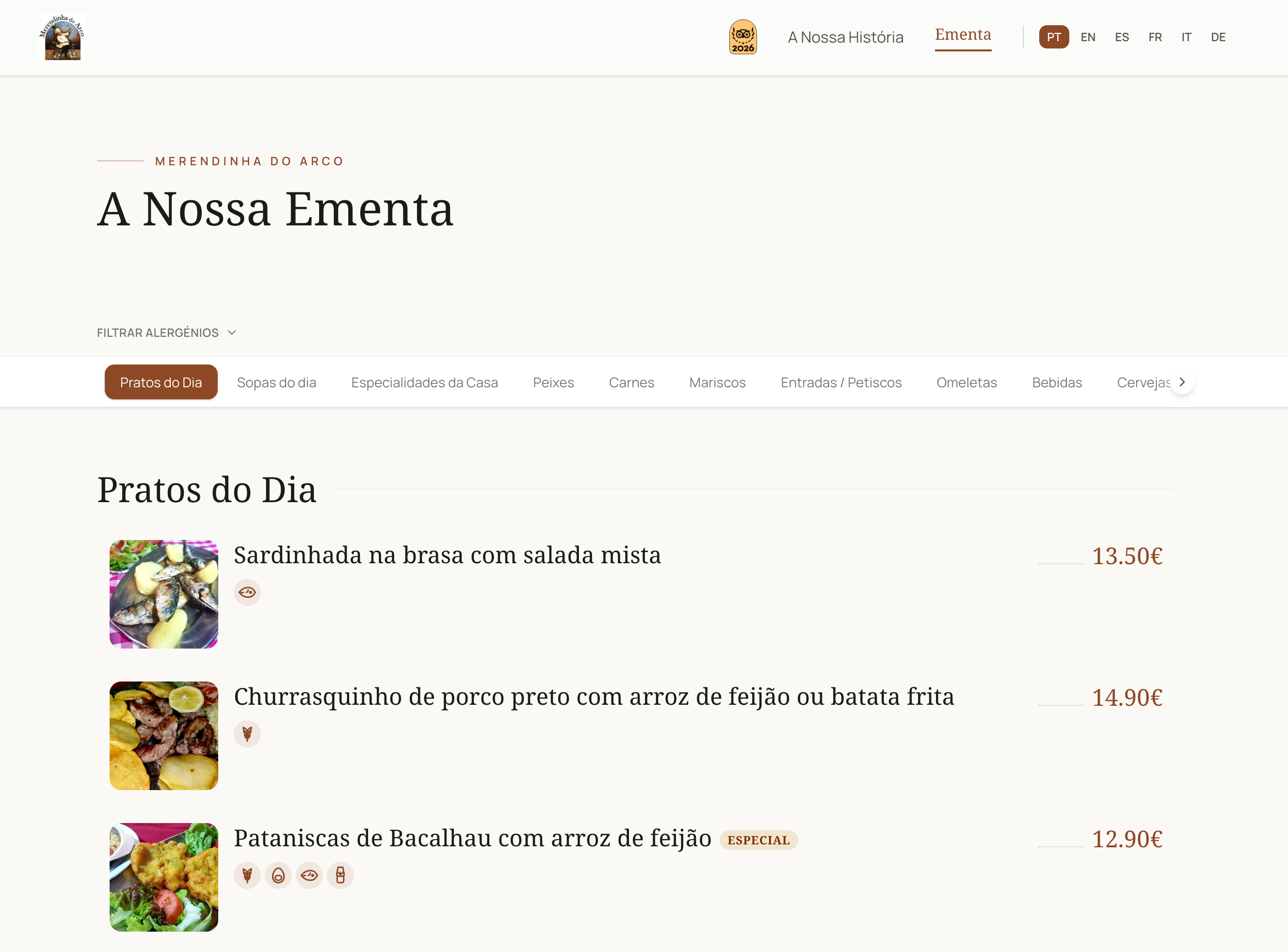
When I started working on the digital menu for Merendinha do Arco, the problem wasn't putting a menu online. The problem was that the menu was never really finished.
The dishes of the day changed, as they do in any traditional Portuguese restaurant. Photos had to be swapped out and the information kept current, so that what the customer saw on their phone matched what they could actually order at that moment.
These daily updates matter more and more, because it isn't only Portuguese customers who visit. Foreign visitors come looking for a dining experience in a different country.
That was when I realised that a QR code is not a digital menu. It is only a way to open a page.
The real product begins after the scan.
A menu is not a static document
The easiest way to digitise a menu seems obvious: export a PDF, create a QR code and print it on the tables. For a while, it works. Then a dish changes, a price changes, or a new special appears.
At that point, what looked like a simple solution starts to reveal its cost. You have to edit the file, export it again, make sure the right version was published, and confirm there is no old copy left somewhere else. If there are several languages, the same work multiplies.
A restaurant doesn't work like a document. It works at the pace of the kitchen.
There are permanent dishes and dishes that depend on the day, the season or the availability of ingredients. A digital menu has to accept that reality. It should be easy to add, remove or highlight a dish without rebuilding the whole menu.
That was the first shift in perspective: instead of thinking of the menu as a finished page, I began to see it as a living system.
A living system has no final version. It has a version that is correct right now.
Translating the name doesn't translate the dish
There was another problem, less operational but just as important.
For anyone who grew up in Portugal, names like pataniscas de bacalhau, arroz de feijao, choco frito or bacalhau a Minhota immediately bring an image to mind. We more or less know what will arrive at the table. For many tourists, they are just unfamiliar words.
A literal translation helps, but it doesn't solve everything. The customer still doesn't know what the dish looks like, how it is served, or why it is a typical Portuguese choice.
This is where the photograph stops being decoration.
A good photograph reduces uncertainty. It helps the visitor understand the dish before ordering it and gives them the confidence to choose something they don't know. In a restaurant frequented by tourists, that can make the difference between trying Portuguese food and settling for whatever looks familiar.
But photographs also create work. Dishes change, presentation can change, and an old image can promise something different from what reaches the table. So managing photos is part of managing the menu. It isn't a separate task you do once and forget.
The experience begins before the first dish
Merendinha do Arco is a traditional Portuguese restaurant in the centre of Lisbon. Many visitors want to live an experience they recognise as Portuguese.
That means the menu shouldn't limit itself to listing products and prices. It should also help tell the restaurant's story, present its identity, and prepare the customer for the kind of experience they will find.
There is a delicate balance here. If we strip away all the context, the restaurant becomes just another list of dishes on a screen. If we turn everything into an artificial tourist attraction, we lose the authenticity we wanted to show.
Technology should act as a window into the restaurant, not a set piece placed in front of it.
For me, this became one of the most important principles of the project: digitising a traditional business does not mean modernising its personality. It means making that personality easier to discover.
The best digital menu doesn't look like a generic app that could belong to any restaurant. It looks like a natural continuation of that restaurant.
What a digital menu needs to solve
A useful digital menu should let you:
- update dishes, prices and availability without rebuilding the whole menu;
- easily distinguish permanent dishes from the dishes of the day;
- manage each photograph next to the dish it represents;
- present the information in several languages without losing the original meaning;
- explain the dishes a foreign visitor might not recognise;
- tell the story and preserve the identity of the restaurant;
- work well on a phone, with no installs, accounts or unnecessary steps;
- show clear signs that the customer is on a legitimate address belonging to the restaurant.
None of these points is particularly impressive on its own. That is precisely why they are easy to overlook.
But the best products for small businesses are often like this. They don't try to dazzle with a technological demo. They bring together several small decisions that take work away from whoever runs the business and uncertainty away from whoever visits it.
After the menu comes the temperature log
There is a part of this work the customer never sees and that eats time every single day: the food-safety records.
In a traditional restaurant, that usually lives on a printed sheet taped up next to the fridge. Someone reads the temperature, writes a number by hand, and the sheet goes into a binder. The day an inspection turns up, you have to find the binder, find the right page, and hope nobody forgot to fill in a line.
The problem is exactly the same as the PDF menu: the record exists, but it isn't alive. Nobody knows Tuesday's reading is missing until someone leafs through the binder - and by then there is nothing to be done about it.
Since the restaurant was already logging into the admin panel every day to change the dishes of the day, it made sense for HACCP to live in the same place. Not in a second app, with a second password, that nobody opens.
So the digital menu for Merendinha do Arco isn't only the menu. It also has a HACCP module:
- every piece of equipment on file - fridges, freezers, chest freezers, cold displays, bains-marie, walk-in rooms - with its own temperature limits and warning margins;
- temperature readings with automatic classification (compliant, warning, or out of range), author, exact time, and that keep working when the kitchen loses its connection;
- corrective actions tied to the reading that triggered them: move the product, restart the equipment, discard, call the technician;
- equipment calibrations, with measured deviation, next due date and the certificate stored alongside;
- verification plans with a defined frequency and a justified record of the checks that were missed;
- alerts in the panel when a reading goes out of range, including who acknowledged them and when;
- an append-only audit trail: who changed what, when, and from where.
One detail changes the nature of the software: these records are immutable. A reading cannot be corrected or deleted. If it was out of range, it stays out of range, and what gets added on top is the corrective action.
The logic comes from HACCP itself and from Regulation (EC) 852/2004: records exist to prove what happened. A record you can rewrite proves nothing - and that is where a pencilled sheet and a spreadsheet are worth exactly the same.
This isn't a feature you sell with a pretty demo. It is boring work that stops being done twice, and a ready answer on the day someone asks to see the last six months of records.
Where AI can help - and where it shouldn't decide
A menu with several languages and changing content also creates opportunities to use AI. It can help prepare a first translation, suggest a clearer description of a dish, or organise repetitive information.
But a first version is not a version ready to publish.
AI doesn't automatically know the recipe used in that restaurant, the ingredients of that day, or the way the dish reaches the table. A seemingly correct translation can erase a cultural reference or introduce a description that no longer matches the kitchen.
That's why the most useful workflow doesn't take the person out of the process. The AI prepares; someone who knows the restaurant confirms.
This separation matters: the machine can speed up transforming the content, but responsibility for the truth of the menu stays with the restaurant.
The QR code was the smallest part
Tourists needed to understand dishes they had never seen. The photos needed to keep up with what the kitchen actually served. The restaurant's story needed to be present without turning the experience into a caricature. And the digital access needed to earn the trust asked for by each scan.
That's why the solution couldn't be just a PDF with a QR code.
A digital menu is a small link between the kitchen, the restaurant and the customer. It has to keep up with the speed of the first, respect the identity of the second, and reduce the uncertainty of the third.
When it does that well, the technology almost disappears. The customer doesn't think about the system, the content management or the translations. They understand what they can order, feel confident to try something Portuguese, and start getting to know the restaurant before the dish reaches the table.
The QR code opens the page. The experience is everything we build after it.
This is a real project. See the digital menu I built for Merendinha do Arco →